Aimbot controls
FOV
How wide the aimbot searches around your crosshair. Targets outside this area are ignored.
Smooth
How gradually the aim travels once a target is picked.
Speed
How quickly the aimbot moves toward the selected bone.
Stickiness
How strongly the aimbot stays on the current target.
Aimbot Filter
Narrows which targets the aimbot may consider.
Bone Selection
Closest, Head, Neck, or Chest. This is where the crosshair settles on the target.
2 Aimbot Keybinds
Two activation keys, including native controller keybinds without remapping.
Visible Check
Skips targets that fail the visibility check.
Ignore Knocked
Ignores knocked players when choosing a target.
Draw FOV
Draws the aim FOV on screen for tuning.
Draw Target Line
Draws a line from your crosshair to the locked target.
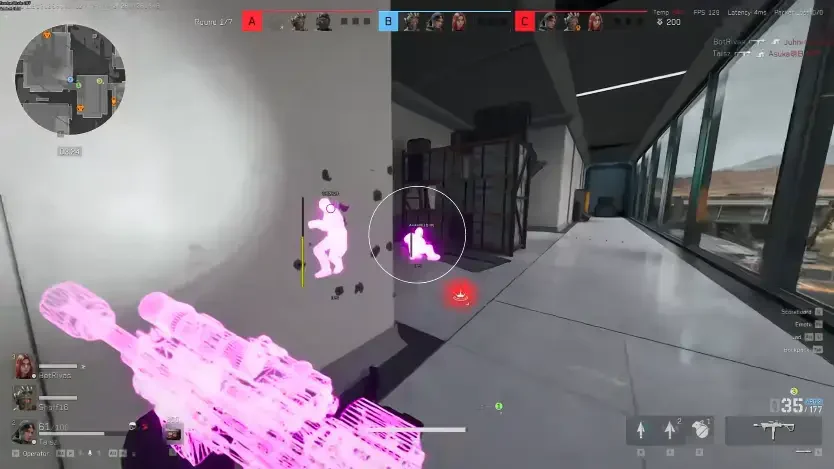
How the aimbot picks and moves
FOV and Aimbot Filter decide who is eligible. Bone Selection, Speed, Smooth, and Stickiness decide how the crosshair moves once someone is chosen.
Use Draw FOV while tuning, then turn it off when you are happy with the area.
Visible check and ignore knocked
Visible Check keeps the aimbot from locking through solid cover when that check fails.
Ignore Knocked stops wasted locks on downed players when you only care about upright threats.
Works well with
Related reading
Delta Force aimbot questions
Can I use player ESP without the aimbot?
Yes. Turn the aimbot off and player ESP, loot ESP, chams, and misc still run.
What bones can I select?
Closest, Head, Neck, or Chest, as listed on the product page.
Do I need two keybinds?
The menu supports two aimbot keybinds, including controller binds without remapping.
Aimbot ships with the full menu
One license covers every module. Monthly is $35 for 31 days. Lifetime is $150.
Around the site
Status, checkout, and the guides that sit around this module.